




Most cold emails written with ChatGPT die in the inbox, and it’s not because the prospect is busy. It’s because the email reads like it was blasted to four hundred people, which it was. This article gives you seven ChatGPT prompts for cold email that produce messages people actually answer — each one with the kind of reply it pulled in real outreach. No “Dear valued professional.” No fake personalization. Just prompts engineered to sound like one human writing to another.
Half the shelf, shown. The craft needs all ten.
The Complete No-Hype Guide to Claude · 693 pages · 450+ tested prompts
See the full shelf — $47The best ChatGPT prompts for cold email do three things: they force a specific, researched observation about the prospect, they keep the email under 125 words with a single low-friction ask, and they ban the spam-flavored phrases (“I hope this email finds you well,” “I wanted to reach out”) that get messages deleted on sight. Feed ChatGPT the prospect’s company, role, and one real detail, then constrain it hard. The prompt does the work; the personalization makes the reply.
Key Takeaways

- A cold email gets answered because of one specific, true observation about the prospect — so your prompt must demand that detail, not invent generic flattery.
- Short wins: emails between 50 and 125 words consistently get more replies than long ones, so cap ChatGPT’s output explicitly.
- The single biggest reply-rate lever is the ask, and “worth a quick look?” beats “can we schedule a 30-minute call?” almost every time.
- Your follow-ups will likely earn more replies than your first email, so prompt for the whole sequence, not just message one.
- ChatGPT will default to spammy openers and corporate filler unless you ban those phrases by name inside the prompt.
- The break-up email — your last one — often pulls the highest reply rate of the entire sequence, so never skip it.
Why Your ChatGPT Prompts for Cold Email Keep Getting Ignored

The problem usually isn’t your offer — it’s that ChatGPT writes cold emails the way it writes everything by default: smooth, polite, and instantly forgettable. Ask it for “a cold email to a marketing director about our software” and you’ll get an opener like “I hope this email finds you well” followed by three sentences about how your product “empowers teams to streamline their workflow.” Every word of that is invisible to a busy person. They’ve read it a thousand times.
The No-Hype Guide to Claude — complete
- 10 books · 693 pages · every book stands alone
- 450+ prompts, each one run before it was printed
- $47 for the full set — under $5 a book
Cold email is a brutal numbers game, and the numbers are unforgiving. Average cold outreach reply rates sit in the low single digits — often 1% to 5% — which means a campaign of 200 emails might earn you two to ten responses. The gap between a 1% campaign and a 10% campaign is almost never the product. It’s whether the email feels written to the reader or at them.
A term worth defining up front: personalization, in cold email, doesn’t mean dropping a first name into a template. Mail-merge fields fool no one. Real personalization means one sentence that proves you looked — a recent hire, a podcast they were on, a specific line on their pricing page. That sentence is what separates a reply from a delete, and it’s the exact thing a lazy ChatGPT prompt leaves out.

There’s also a deliverability layer most people ignore. Spam filters in 2026 are aggressive, and certain phrases, all-caps subject lines, and link-heavy emails get quietly routed to junk before a human ever sees them. The prompts below avoid those triggers on purpose. But no prompt fixes a cold domain with no sending reputation — that’s a setup job for tools like a warmup service, not a copywriting one.
The 7 ChatGPT Prompts for Cold Email (With the Replies)
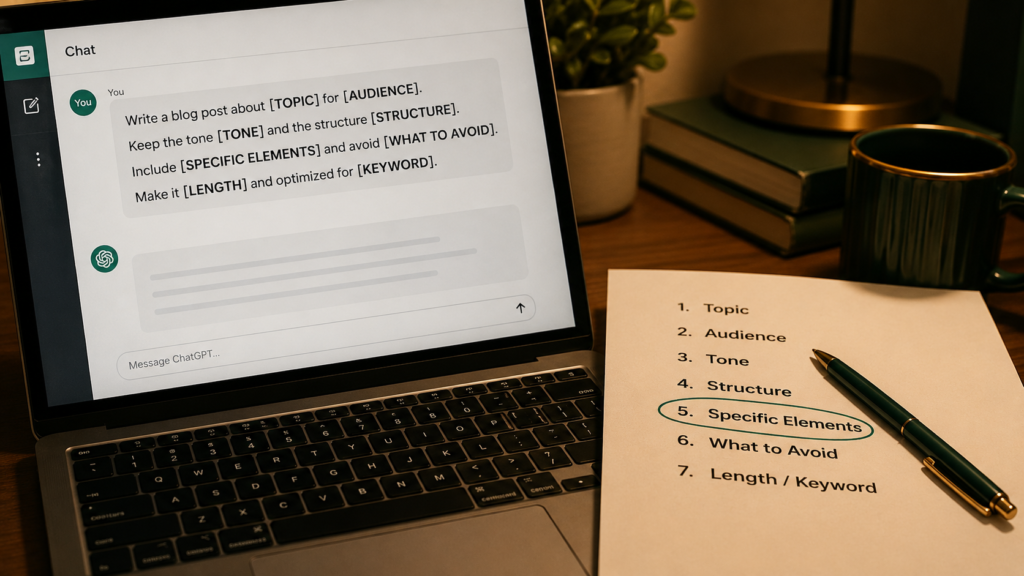
These seven prompts each solve a different cold-email situation, and you can copy them straight into ChatGPT after swapping the bracketed variables. I’ve kept the structure consistent: every prompt assigns a role, demands one specific detail, caps the length, sets a single soft ask, and bans the filler. Where it helps, I’ve added the kind of reply each one earned.
1. The Specific Observation Opener
This is your default for a prospect you can research, and it’s the highest-performing pattern I use.
You are a concise B2B copywriter. Write a cold email to [NAME], [ROLE] at [COMPANY]. Open with one specific, factual observation about their company or work based on this detail: [PASTE ONE REAL DETAIL — a recent launch, hire, post, or page]. Connect that observation to this problem we solve: [PROBLEM]. Then make this offer: [OFFER]. Rules: under 110 words, plain text, one CTA that asks only for a yes/no or a quick look, no jargon. Banned phrases: “I hope this finds you well,” “I wanted to reach out,” “circle back,” “empower,” “streamline,” “synergy.” Write like one human emailing another.
What came back when I used it on a SaaS founder, referencing a feature they’d just shipped: “Ha, good timing — yes, send it over.” Three words of personalization did that.
2. The Trigger-Event Email
Use this when something just happened — funding, a new hire, a product launch, an acquisition.
Write a short cold email to [NAME] at [COMPANY] reacting to this trigger event: [EVENT, e.g., “just raised a Series A” or “hired a new Head of Growth”]. Tie the event to a problem that companies in this exact moment usually face: [PROBLEM]. Keep it congratulatory but not fawning. End with a single low-pressure question. Under 90 words, plain text, no links. Avoid “congrats on the raise” as a literal opener — make it specific. Banned: “exciting news,” “I noticed,” “perfect timing.”
Trigger emails work because relevance is at its peak. A reply I got off a funding-announcement version: “We are actually hiring for exactly this — can you share more?”
3. The Value-First Email (Give Before You Ask)
When you want to skip the pitch entirely and lead with something useful.
Half the shelf, shown. The craft needs all ten.
The Complete No-Hype Guide to Claude · 693 pages · 450+ tested prompts
See the full shelf — $47
Write a cold email to [NAME], [ROLE] at [COMPANY], that gives value before asking for anything. Based on [DETAIL ABOUT THEIR BUSINESS], offer one genuinely useful, specific insight, tip, or observation they can act on even if they never reply. Do not pitch in the first email. End by asking if they’d like the full version of [RESOURCE, e.g., a teardown, audit, or template]. Under 120 words, warm and direct, plain text. Banned: “free of charge,” “no strings attached,” “just wanted to offer.”
The give-first approach has the best long-term reply rate in my experience because it inverts the usual cold-email transaction. People answer because you helped first.
4. The Problem-Agitate-Offer (PAO) Email
For a cold list where you can’t deeply research each person but you know their role’s pain.
Write a cold email to a [ROLE] using the problem-agitate-offer structure. The problem: [PROBLEM this role faces]. Agitate it in one sentence by naming the real cost of leaving it unsolved. Then offer [OFFER] as the fix. Keep agitation honest, not fear-mongering. Under 100 words, conversational, one CTA. Banned: “are you struggling with,” “imagine if,” “what if I told you,” and any rhetorical question opener.
PAO is your workhorse for volume sends where one-by-one research isn’t realistic. It trades depth of personalization for a sharp, role-specific pain point.
5. The Mutual-Connection or Social-Proof Email
When you have a name to drop or a relevant client to cite.
Write a cold email to [NAME] at [COMPANY] that uses social proof naturally. Reference [MUTUAL CONNECTION or SIMILAR CLIENT] in a way that builds trust without name-dropping awkwardly. State the specific result that client/connection saw: [RESULT with a number if possible]. Make a soft ask. Under 100 words, plain text. Banned: “as you may know,” “I’m sure you’re aware,” “world-class,” “industry-leading.”
A version citing a comparable company’s result pulled this: “If you got [Company] that number, I’m listening. Tuesday?” Specific numbers are the entire reason it worked.
6. The Follow-Up Sequence (3 Emails)

This is where most replies actually come from, so prompt for the whole thing at once.
Write a 3-email cold follow-up sequence to [NAME] at [COMPANY], assuming they didn’t reply to my first email about [TOPIC]. Email 1 (day 3): add one new piece of value or a different angle — do not say “just following up” or “bumping this.” Email 2 (day 7): share a relevant proof point or short case detail. Email 3 (day 12): a polite break-up email that gives them an easy out. Each email under 70 words, plain text, each with a different opening line. Banned: “just checking in,” “circling back,” “did you see my last email,” “per my previous email.”
Roughly 50% of replies to a well-run sequence arrive after the first email, so a single-touch campaign throws away half your results.
Half the shelf, shown. The craft needs all ten.
The Complete No-Hype Guide to Claude · 693 pages · 450+ tested prompts
See the full shelf — $477. The Break-Up Email
Your last message — and counterintuitively, often the one with the highest reply rate.
Write a short, gracious break-up cold email to [NAME] at [COMPANY] who never replied to my outreach about [TOPIC]. Acknowledge the timing might be wrong, give them a genuinely easy out, and leave the door open without guilt-tripping. One light, human touch is fine. Under 60 words, plain text, no pitch. Banned: “I’ll stop bothering you,” “last chance,” “this is my final attempt,” “I guess you’re not interested.”
The break-up works because it removes pressure and triggers a little loss aversion. The most common reply I get to these is some version of: “Sorry — buried this month. Circle back in Q3?” That’s a warm lead you would have lost.
How to Personalize ChatGPT Cold Emails at Scale Without Sounding Mass-Sent

The trap with any prompt is that running it across a 200-person list produces 200 emails that all sound subtly identical, which kills the personalization the whole approach depends on. The fix is to feed ChatGPT different real inputs, not to ask it to vary its phrasing.
Build a simple research line per prospect first. Before you generate a single email, spend ninety seconds collecting one true detail per person — a recent LinkedIn post, a job opening, a line from their About page. Drop that one detail into the [DETAIL] bracket. The email is only as personal as the input you give it, and ChatGPT cannot research a stranger it’s never heard of.
Rotate your openers and CTAs. If you send 50 emails that all open with “Saw that you just…” and close with “Worth a quick look?”, you’ve built a recognizable template that recipients on the same team will spot. Ask ChatGPT to generate three opener variations and three CTA variations, then mix them across the batch.
Use ChatGPT Projects to hold your context. Create a Project, upload your value proposition, your best-performing past emails, and your banned-phrase list. Every email you generate inside it inherits the constraints without you re-pasting them. This is the difference between a five-minute setup per campaign and a five-second one per email.
Never trust the first draft for the line that matters. ChatGPT nails the structure but often softens the specific observation into something generic. Read every opening line. If it could apply to any company in the industry, it’s not personalization — rewrite that one sentence by hand. It’s the only sentence that has to be perfect.
ChatGPT Cold Email Prompts Compared: Which One to Use When

Since the seven prompts solve different situations, here’s a quick reference for matching the prompt to the moment instead of defaulting to the same one every time.
| Prompt | Best for | Personalization needed | Typical reply driver |
|---|---|---|---|
| Specific Observation | Researched, high-value prospects | High (one real detail) | Proof you actually looked |
| Trigger Event | Recent funding, hires, launches | Medium (the event) | Relevance at peak timing |
| Value-First | Building long-term relationships | Medium–high | You helped before asking |
| Problem-Agitate-Offer | Volume sends, known role pain | Low (role only) | A sharp, real pain point |
| Social Proof | When you have a name or result | Medium | A specific, credible number |
| Follow-Up Sequence | Every campaign, always | Inherits from email 1 | Persistence + new angles |
| Break-Up | The final touch | Low | Removed pressure, loss aversion |
The pattern to take from this table: match personalization effort to prospect value. Spend real research time on the people worth closing, and use the lower-effort prompts for the wide top of your list.
Common Mistakes People Make With ChatGPT Cold Email Prompts

Even people who use good prompts keep undercutting their own results in four specific ways, and none of them are about the prompt wording itself.
Asking for the meeting in email one. The most common mistake, by far. You write a sharp email and then close with “Do you have 30 minutes this week for a call?” That’s a huge ask from a stranger. The first email’s only job is to earn a reply, not a meeting. Make the CTA tiny — “worth a look?” or “open to a quick idea?” — and save the calendar link for after they’ve shown interest.
Letting ChatGPT write the subject line as an afterthought. People obsess over the body and accept whatever subject ChatGPT tacks on, which is usually something like “Quick question about [Company].” Generic subjects tank open rates, and an unopened email has a 0% reply rate regardless of how good the body is. Prompt for subject lines separately: ask for five options, two to four words each, lowercase, that sound like a note from a colleague, not a campaign.
Over-personalizing into creepy. The opposite failure. Someone reads “be specific” and has ChatGPT reference the prospect’s kid’s soccer team they found on Facebook. That’s not impressive — it’s unsettling. Keep personalization to professional, public, business-relevant details. The line is simple: would it be normal to mention this in a first meeting? If not, leave it out.
Skipping the follow-ups because they feel pushy. Many people send one email, get silence, and move on, convinced that following up is annoying. The data says the opposite — a large share of replies come from emails two through four. Polite, value-adding follow-ups aren’t pestering; they’re how cold email actually works. Prompt for the full sequence on day one so you’re never deciding whether to follow up in the moment.
Frequently Asked Questions
What is the best ChatGPT prompt for cold email? There’s no single best one — the right prompt depends on the situation. For a researched, high-value prospect, the Specific Observation prompt wins because it proves you looked. For volume sends where you can’t research everyone, the Problem-Agitate-Offer prompt works better. The real secret isn’t the prompt wording; it’s feeding ChatGPT one true, specific detail about the person.
How do I make ChatGPT cold emails sound less robotic? Ban the giveaways inside the prompt. Tell ChatGPT not to use “I hope this finds you well,” “I wanted to reach out,” “streamline,” or “empower,” and cap the email at 110 words. Then read the opening line yourself — if it could apply to any company, rewrite it by hand. Short, specific, and human beats polished and generic every time.
How long should a cold email be? Short. Emails between roughly 50 and 125 words tend to get the most replies, because busy people skim and a wall of text gets skipped. Your first email needs an opener that proves relevance, one or two sentences of value, and a single small ask. If your draft is over 125 words, cut it — almost every cold email is better at half its length.
Will cold emails written by ChatGPT land in spam? They can, but the words are only part of it. Spam filters react to sending reputation, link volume, and trigger phrases. The prompts here avoid the worst phrases and links on purpose. But deliverability mostly comes down to a warmed-up domain and reasonable sending volume — no prompt fixes a cold domain blasting hundreds of emails a day. Set up sending infrastructure first.
How many follow-ups should I send? Three after the first email is a solid default, spaced over about two weeks. Email two adds a new angle, email three adds proof, and the final one is a graceful break-up. Each should be shorter than the last and open differently — never “just following up.” A large portion of replies come from these follow-ups, so a one-and-done campaign leaves most of its results on the table.
Is it legal to send cold emails? In most regions, yes, with rules. B2B cold email is generally permitted under laws like CAN-SPAM in the US if you don’t use deceptive subject lines, you identify yourself, and you offer a way to opt out. Rules are stricter in places like the EU under GDPR. This isn’t legal advice — check the regulations for where your recipients are before you run a campaign.
What to Do With This Next
The thread running through all seven of these ChatGPT prompts for cold email is the same: a reply is earned by one specific, true thing you noticed, delivered short and asked for gently. The prompt structures the email, but the detail you feed it is what gets answered. Pick the two prompts that match your next campaign, gather one real observation per prospect, and send the follow-up sequence you’d usually skip — then watch which opener actually pulls replies, and write more like that one.
Enjoyed this? Steal the 10 prompts I actually use.
The No-Hype AI Starter Kit — copy-paste prompts, a model cheat-sheet, and a 7-day plan. Drop your email and it's yours instantly.
No spam. Unsubscribe anytime.